Tolvi Working Papers, working papers software for UK practicesYear-end files your reviewer can actually follow
Tolvi Working Papers is working papers software for UK practices: trial balance import, lead schedules, review points, sign-off and corporation tax computations in one place. Use it with Tolvi Accounts or alongside the accounts production software you already use.
Get early accessSee how it works
Tolvi is in early access. We're opening to a small number of UK practices. When sign-ups open, the free trial is 30 days with 5 year-end files, each for one client, and no card.

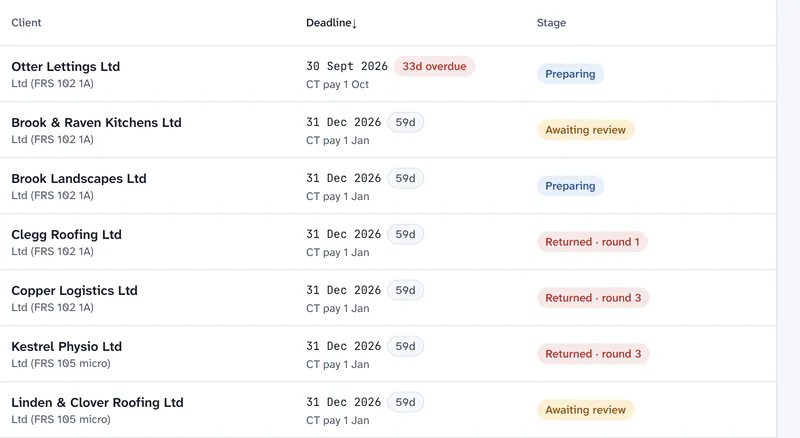



No more “can you send me the TB?”
Pulls the trial balance from Xero, or from a CSV or Excel file from any system.
Which software Tolvi connects toWhat it is, and isn’t
Your file, not your accounts
Prepare, review and sign off the year-end file here. Use it with Tolvi Accounts and Corporation Tax or your own software: it needs neither, and it replaces spreadsheet working papers and review notes in emails. It doesn't file anything with HMRC or Companies House.
Diagram: the trial balance comes from the client's bookkeeping software into Tolvi Working Papers, where the file is prepared, reviewed and signed off. The final figures then go to Tolvi Accounts and Tolvi Corporation Tax, or to your own software, for the statutory accounts and returns. Filing stays with your own software for now.
Your client's bookkeeping software
A connection to Xero, or a CSV or Excel export from any system
Tolvi Working Papers
TB, mapping, lead schedules, evidence, journals, reconciliations, tax, review and sign-off
Tolvi Accounts and Corporation Tax, or your own software
Statutory accounts, the CT600 and iXBRL. Filing stays with your own software for now
Five steps. One file.
Walk through one client's year-endStep 1: Bring in the TB
Pull the trial balance from the client's bookkeeping software at the period end and the prior period end, or upload a CSV or Excel file.
Step 2: Map it once
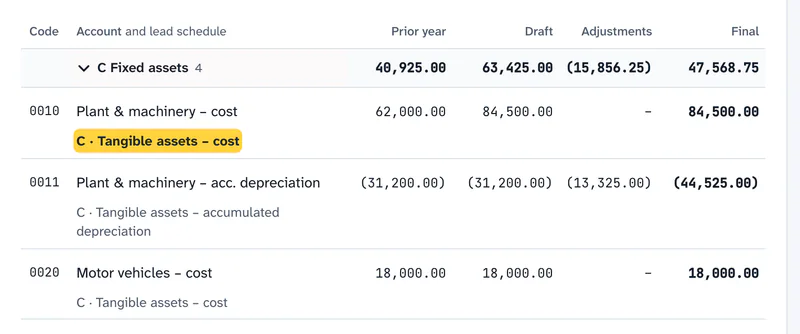
Map each nominal code to a lead schedule.
Step 3: Prepare the file
Work through lead schedules, checklists, reconciliations, the fixed asset register and the corporation tax computation.
Step 4: Review and clear
Reviewers raise review points against the exact line.
Step 5: Sign off and export
Sign off through your firm's own stages. Journals lock after review, and the whole file exports as a PDF with its index, review history and workflow timeline.
Next year, the mapping’s already done.
Section by section, B to X
Everything here is in the product today. What’s coming has its own page.
B: Trial balance and mapping
TB pulls from bookkeeping software, CSV and Excel upload, firm mapping rules and mappings remembered per client.
T: Corporation tax
The computation from the final TB, with capital allowances from the register, losses and deferred tax, and a tax journal posted back to the TB.
C: Fixed asset register
Assets brought forward, additions, disposals with proceeds, depreciation and the fixed asset journal, checked against the TB.
X: Journals
Year-end adjustments that flow to the final TB. Final balances are always the draft TB plus posted journals, never retyped.
F–J: Reconciliations
Bank to the statement, VAT to Box 5, PAYE/NI to the P32, pension to the provider schedule, CIS to the CIS300, loans to the lender's statement, and the director's loan or partners' and members' current accounts.
Lead schedules
W/P refs, prior year comparatives, variances, variance notes, tickmarks and evidence attached to the line.
Review points and sign-off
Threads against the line, your firm's own workflow stages, amendment rounds, @mentions and segregation of duties at sign-off.
The working paper file
A PDF with a cover, index, sections, review history, workflow timeline and an evidence appendix.
Set it up in the quiet months
A skippable tour, firm-wide defaults, and mappings remembered for each client.
Hosted in London. Each firm walled off.
Amazon Web Services in London (eu-west-2), encrypted in transit and at rest, with each firm kept apart by the database itself.
How Tolvi looks after your clients' dataTolvi AI suggests. A person decides.
It can explain a movement, suggest a mapping and draft a client query. Nothing changes until someone accepts it, and it can never sign off or approve.
Tolvi AI on the features pagePlays well with Meetings and Books
Tolvi Meetings
Client meetings, filed to the client
Notes sit on the same client record, and a next step can become a review point.
What Tolvi Meetings doesTolvi Books
The trial balance with no import
Working Papers pulls the trial balance straight from a client’s Tolvi Books, already mapped.
What Tolvi Books does for practices
Priced by year-ends, not by people
Tolvi Working Papers plans are sized by the number of year-end files your practice starts in a year, from £5 a month for 12 year-end files. A year-end file is one client's file for one accounting period. It counts when you start it. Every plan includes every feature. Pay annually for 15% off. Tolvi is not VAT-registered, so no VAT is added.
Where it stops today
What’s live and what’s coming- Tolvi Working Papers is the file, not the accounts. Use it with Tolvi Accounts or alongside your own accounts production package.
- Tolvi Working Papers isn’t audit software, and it has no statutory audit methodology.
- Xero connections work today. QuickBooks Online, Sage and FreeAgent connections are coming, so upload a CSV or Excel trial balance for those clients.
Questions about Tolvi Working Papers
What is Tolvi Working Papers?
Tolvi Working Papers is cloud working papers software for UK accountancy practices. It brings a client's trial balance, lead schedules, tickmarks, journals, reconciliations, review points, sign-off and the corporation tax computation into one year-end file.
Does Tolvi replace our accounts production software?
It depends on the client. Tolvi Accounts prepares accounts for limited companies and LLPs under FRS 105, FRS 102 Section 1A and full FRS 102, non-statutory accounts for sole traders and partnerships, and charity accounts, as PDF, Word and, for companies and LLPs, iXBRL. It doesn't prepare group accounts, public companies' accounts or IFRS accounts, so keep your existing software for those, and it doesn't file anything. Tolvi Working Papers works either way: it replaces the spreadsheet working papers and the review notes in emails, and you can take the final figures into Tolvi Accounts or your own accounts production software.
Which bookkeeping software does Tolvi connect to?
Tolvi connects to Xero, using its own sign-in, and pulls the trial balance at the period end and the prior period end. Connections to QuickBooks Online, Sage Business Cloud Accounting and FreeAgent are coming. For those and any other system, upload the trial balance as a CSV or Excel file.
Does Tolvi do tax computations?
Tolvi prepares the corporation tax computation from the final trial balance, with capital allowances from the fixed asset register, losses and a deferred tax working, and posts the tax journal back to the trial balance. For sole traders, partnerships and LLPs, Working Papers prepares the self assessment computation: adjusted profit, basis periods and the tax-year basis, and each partner’s share. Tolvi Corporation Tax and Tolvi Self Assessment then produce the draft returns. Filing from Tolvi is coming.
Can I sign up for Tolvi now?
Not yet. Tolvi is in early access and is opening to a small number of UK practices. Email support@tolvi.co.uk with your firm name, roughly how many year-end clients you have and the bookkeeping software they use, and we'll be in touch.
More answers on the questions and answers page.