Admin console, the control panel for your practiceYou choose who uses what
The Admin console is the control panel for your practice, where a firm admin runs Tolvi for the practice: which products you have, who can use each one, your people and the audit log. It’s included for every practice.

What it does
Run Tolvi for the practice
Products
One card for each Tolvi app. A firm admin starts a trial, chooses a plan, and says whether the app is for everyone in the practice or only the people they tick.
People
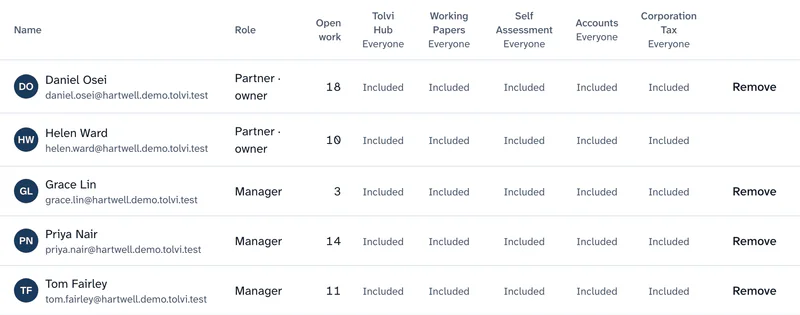
One table of everyone in the firm, with their role, their open work against their capacity and a column for each app.
Audit log
Who did what and when, from imports and mappings to journals, review points and sign-offs.
Clients’ Tolvi Books
See what your firm pays for clients’ Tolvi Books, alongside your other products.
With the rest of Tolvi
Tolvi Hub
One sign-in, one home
What Tolvi Hub doesPricing
What each product costs
Prices for each product
The Admin console is included for every practice and isn’t sold separately.
Compare every productWhere it stops today
What’s live and what’s coming- Tolvi Hub is always on for everyone in the practice, so the Admin console shows a sentence instead of a switch for it.
Questions about Admin console
What is the Admin console?
It’s where a firm admin chooses which Tolvi products the practice has and who can use each one, manages people and capacity, and reads the audit log. It’s included for every practice.
More answers on the questions and answers page.