Tolvi Hub, the home and client record for your practiceEvery client, every file, one page
Tolvi Hub is the home and client record for your practice: the page everyone lands on after signing in, one central record for each client, and the way into every Tolvi app. It’s included for every practice.
What it does
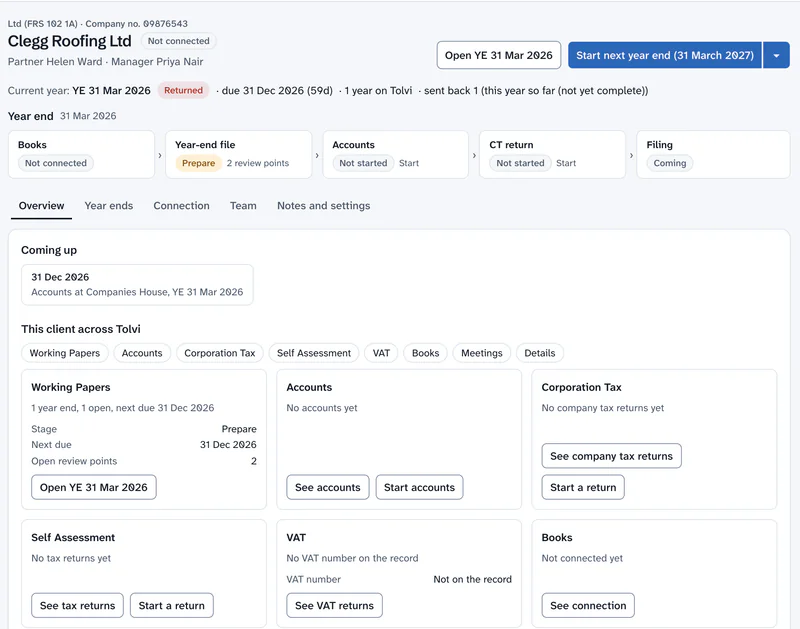
Everything about a client, one click away
Your day on one page
Your turn, to review, overdue and due in the next 30 days, then your next five deadlines and your meetings today.
All work
One list and a month’s calendar of year-ends, accounts and returns across every product a person can use, with each deadline from that product’s own rule.
Notifications across products
Returns sent for review, review points, approvals and reopening reach the right people in the app, and by email if they want it.
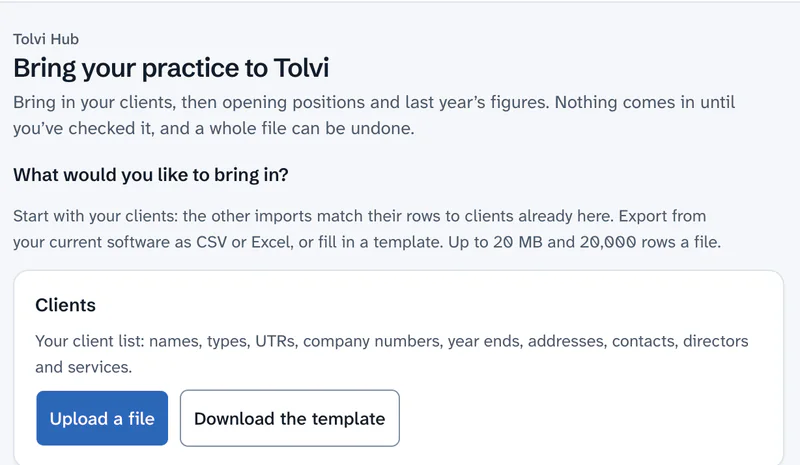
Bring your practice to Tolvi
Import a CSV or Excel file of clients, a client’s trial balance, a company’s losses, pools and director’s loans brought forward, or last year’s self assessment figures to compare against. Existing figures are never overwritten, and National Insurance numbers, dates of birth and bank details are dropped when the file is read.
Suggestions across products
Link a person to a company, and its dividends can be suggested to their SA100, and director advances to the CT600A. Nothing moves until a signed-in person accepts it.
One record for each client
Status, services, UTR, VAT number, PAYE reference, registered address, contacts, responsible partner and client manager.
Who answers for the client
A responsible partner and client manager say who answers for the client, without changing any year-end file’s team. If they’re not set, the record shows the latest year-end file’s people.
Identifiers checked for format
UTRs, VAT numbers and PAYE references are checked for the right format when they’re entered. They aren’t looked up with HMRC. National Insurance numbers and dates of birth are never held on the record.
Also: Linked, never copied · Each person sees what they may use. Every feature
With the rest of Tolvi
Tolvi Working Papers
Year-ends and deadlines
What Tolvi Working Papers doesTolvi Meetings
Every client meeting
What Tolvi Meetings doesAdmin console
Always there
What the Admin console does
Tolvi Hub is included for every practice and isn’t sold separately.
Compare every productWhere it stops today
What’s live and what’s coming- It isn’t a full practice management system. It has no client fees or invoicing, engagement letters, AML or KYC checks, client portal, tasks, time recording or email sync.
- It doesn’t look companies up at Companies House.
- Imports read files you export yourself, one client to a trial balance file, and haven’t yet been tried on a real export from other software. Check the columns Tolvi suggests.
- It’s for practices. A business using Tolvi Books on its own goes straight to its books.
Questions about Tolvi Hub
What is Tolvi Hub?
Tolvi Hub is the page everyone in your practice lands on after signing in, with their work and meetings today and the way into each app. It also holds one central record for each client: details, tax references, contacts, services and who answers for them. It’s included for every practice.
Is Tolvi Hub practice management software?
Only the basics. Tolvi Hub holds the client record and shows your work and deadlines. It has no client fees or invoicing, engagement letters, AML or KYC checks, client portal, tasks, time recording or email sync.
Can we bring our clients and figures in from other software?
Yes, from a CSV or Excel file you export yourself. “Bring your practice to Tolvi” takes clients, trial balances, a company’s losses, pools and director’s loans brought forward, and last year’s self assessment figures to compare against. A manager or above confirms the columns and the rows, existing figures are never overwritten, and the whole file can be undone.
More answers on the questions and answers page.