How it works
Follow one sample year-end, from TB to sign-off
One sample client through a year-end, step by step: Clegg Roofing Ltd, on real screens with sample data.
On this page
The year-end, step by step
Start the year-end file
The manager starts Clegg Roofing's year-end from the Work queue: the entity type, the period, the team and the deadline.
Bring in the trial balance
The preparer pulls the trial balance from Xero at 31 March 2026 and 31 March 2025, checks the preview and confirms.
Map it to lead schedules
Tolvi applies the firm's mapping rules and Clegg Roofing's remembered mappings.
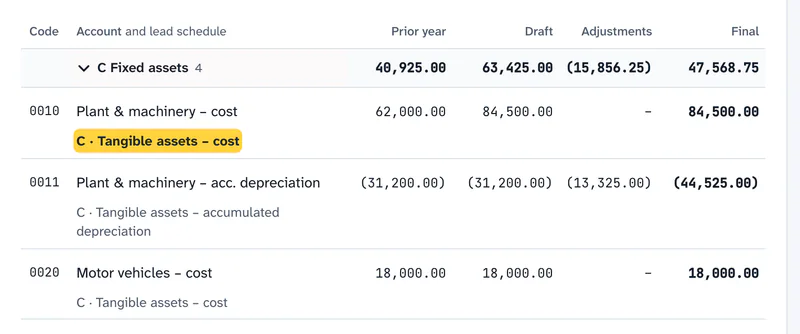
Each nominal code maps to a lead schedule, and the mapping is remembered. Prepare the lead schedules
Each section shows its W/P ref, the 2026 and 2025 figures and the variance.
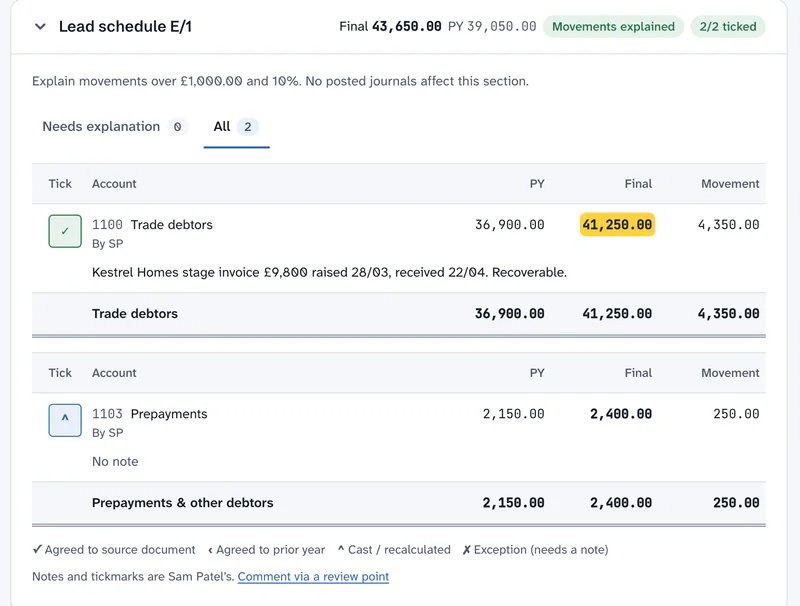
A final balance is the draft TB plus posted journals. Reconcile
The bank reconciliation in F agrees to the 31 March statement, and VAT in H agrees to Box 5 of the return. The director's loan account in J is in credit, so there's no s455 question to consider this year.
Fixed assets and corporation tax
In section C the preparer adds the year's van and records the disposal of the old one with its proceeds.

The register is checked against the TB. Year-end journals
Accruals, prepayments and depreciation are posted in section X. Nothing is retyped.
Review
The preparer submits the file. The manager reviews it section by section and raises two review points against the exact lines: one asking for the loan statement, and one querying an accrual.
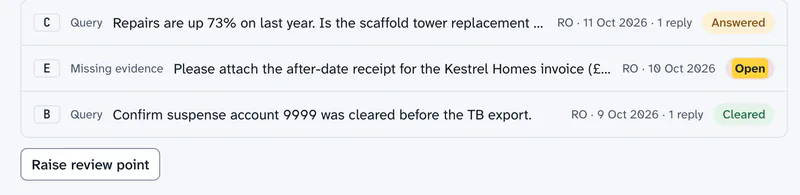
Raised against the section, then answered and cleared. Sign off
Once every review point is cleared, the manager approves the review stage. Tolvi won't let the same person act at stages the firm has set to be separate, and won't approve with review points still open.

Export the working paper file
The partner exports the file as a PDF: a cover, an index with who prepared and reviewed each section and when, the sections, the review history, the workflow timeline and an evidence appendix.
The file becomes the accounts
The manager links a Tolvi Accounts set to the file, and it takes a fixed copy of the final figures. Every page says “Draft, not approved” until a partner records the approval, and the directors approve their accounts. If the file’s figures change, the set is flagged and can’t be approved until someone refreshes it.
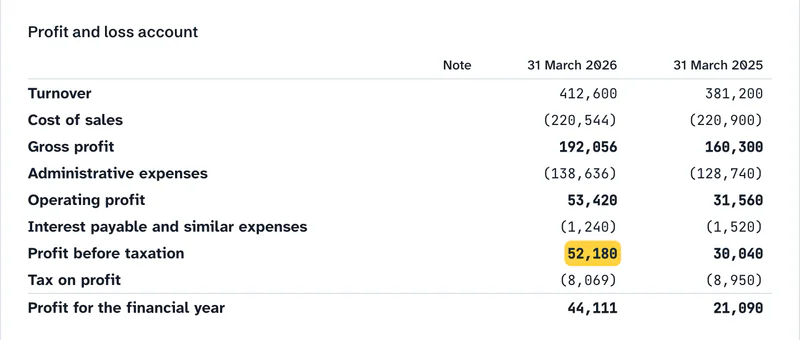
A fixed copy of the file’s final figures. The figures become the CT600
The manager starts a Company Tax Return in Tolvi Corporation Tax from the same file.
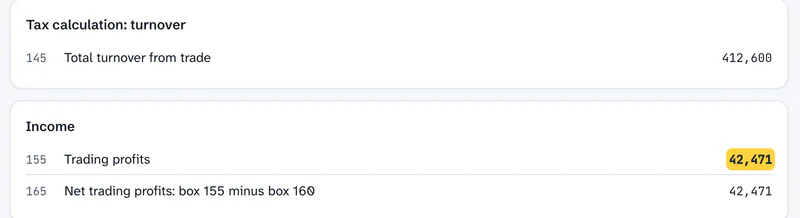
Box 155 is the computation’s trading profit. The director’s return
Clegg Roofing’s director is linked to the company, so its dividends are suggested to their SA100 in Tolvi Self Assessment. Nothing moves until a person accepts it, and the box shows where the figure came from.
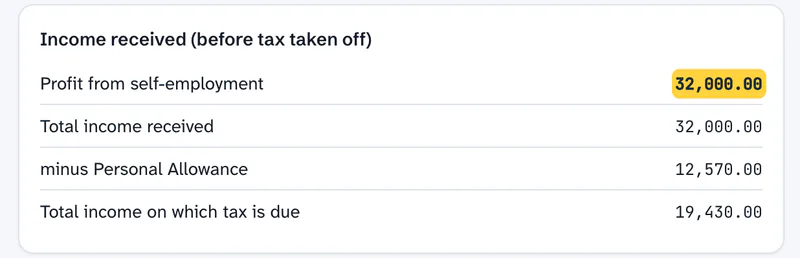
The tax so far updates as figures go in.


Each product also works on its own: take the final figures into your own accounts production software, or the computation into your tax software, if you prefer.
Where Tolvi fits
Tolvi Working Papers sits between your client's bookkeeping software and the accounts and returns, whether you prepare those in Tolvi or in your own software. It's where the year-end file is prepared, reviewed and signed off.
Diagram: the trial balance comes from the client's bookkeeping software into Tolvi Working Papers, where the file is prepared, reviewed and signed off. The final figures then go to Tolvi Accounts and Tolvi Corporation Tax, or to your own software, for the statutory accounts and returns. Filing stays with your own software for now.
Your client's bookkeeping software
A connection to Xero, or a CSV or Excel export from any system
Tolvi Working Papers
TB, mapping, lead schedules, evidence, journals, reconciliations, tax, review and sign-off
Tolvi Accounts and Corporation Tax, or your own software
Statutory accounts, the CT600 and iXBRL. Filing stays with your own software for now
If your current software already gives you lead schedules, review points and a sign-off trail that you're happy with, you may not need Tolvi Working Papers. It's for practices whose working papers still live in spreadsheets, with review notes in emails and Word documents.
Tolvi compared with spreadsheet working papers
The same jobs, in each.
Scroll sideways to see all columns.
| Job | Spreadsheet working papers | Tolvi |
|---|---|---|
| Getting the TB in | Exported from the bookkeeping software and pasted into the template | Pulled from the client’s bookkeeping software, or uploaded as CSV or Excel, and kept as a fixed version |
| Mapping next year | Re-mapped, or copied from last year's workbook | The client's mappings are remembered, and new codes are flagged for you |
| Final balances | Adjusted by hand in the workbook | Always the draft TB plus posted journals |
| Review trail | Review notes in emails, Word documents or cell comments | Review points against the exact line, answered, cleared or reopened, with every round recorded |
| After review | The workbook can still be edited | Journals lock after review |
| Who did what | Initials and dates on each tab | A record of who prepared, reviewed and changed what, and when |
| The file | Printed to PDF, if at all | A versioned PDF with an index, review history, workflow timeline and evidence appendix |
| Where it's kept | On the practice's server or document system | AWS London (eu-west-2), encrypted, with each firm separated by the database |
Where it stops today
The sample stops at the approved draft and the downloads. Filing with HMRC and Companies House from Tolvi is coming, so today you file through your existing software or deliver the accounts yourself.
What’s live and what’s comingQuestions about getting started
What does setting up Tolvi involve?
Setting up Tolvi means inviting your team, choosing your workflow stages, checking the default checklists and mapping rules, and connecting your first client's bookkeeping software. A welcome tour and a getting-started checklist take you through it. Tolvi doesn't quote a set-up time, because it depends on how much your firm changes from the defaults.
Can we try Tolvi on a real client?
Yes, that's what early access is for. Email support@tolvi.co.uk with your firm name, roughly how many year-end clients you have and the bookkeeping software they use, and we'll talk about running one or two real year-ends in Tolvi.
Does Tolvi replace our accounts production software?
It depends on the client. Tolvi Accounts prepares accounts for limited companies and LLPs under FRS 105, FRS 102 Section 1A and full FRS 102, non-statutory accounts for sole traders and partnerships, and charity accounts, as PDF, Word and, for companies and LLPs, iXBRL. It doesn't prepare group accounts, public companies' accounts or IFRS accounts, so keep your existing software for those, and it doesn't file anything. Tolvi Working Papers works either way: it replaces the spreadsheet working papers and the review notes in emails, and you can take the final figures into Tolvi Accounts or your own accounts production software.
More answers on the questions and answers page.